DevOps Best Practices for Observability: Logs, Metrics & Traces
Observability is the ability to understand a system's internal state by examining its external outputs — primarily logs, metrics, and traces. For DevOps teams, it's the difference between guessing what went wrong and knowing exactly where to look.
Picture this: it's 2 AM and your on-call engineer gets paged. A production service is throwing errors, customers can't check out, and revenue is dropping by the minute. The engineer opens three different dashboards, searches five log sources, and still can't connect the dots. Forty-five minutes later, the root cause turns out to be a single misconfigured environment variable.
Now imagine the same scenario with a unified observability stack. Correlated logs, metrics, and traces surface the failing service in under two minutes. The fix ships before most customers even notice.
That's the power of DevOps observability best practices — and this guide breaks down exactly how to implement them.
What Is Observability and Why Does It Matter for DevOps?
Observability is a practice that brings your logs, metrics, and distributed traces into a single view — so DevOps teams can analyze system behavior and troubleshoot issues faster.
Unlike basic monitoring, which tells you that something is wrong, observability helps you understand why it's wrong. With observability in place, DevOps teams can pinpoint root causes, measure system health, spot anomalies, and act before users notice a problem.
An effective observability system lets you trace exactly what went wrong and when. That means faster fixes, stronger performance, and a better experience for your users.
Observability is also a force multiplier for DevSecOps workflows and IT operations (AIOps), because the same telemetry data that reveals performance issues can surface security anomalies and compliance gaps.
What Are the Three Pillars of Observability?
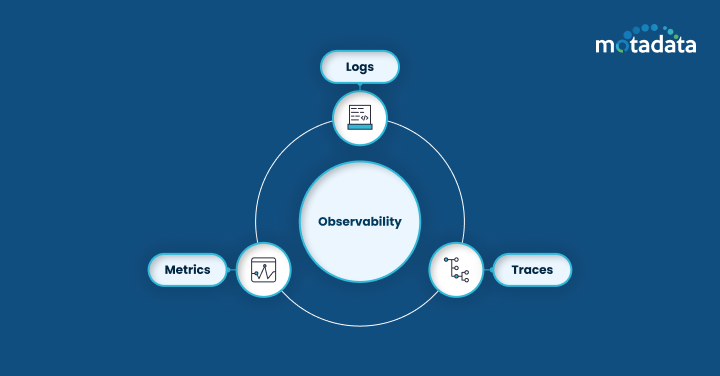
The three pillars of observability — logs, metrics, and traces — each give DevOps teams a different lens into system behavior. Here's how they work and why each one matters.
Logs
Logs are timestamped event records that capture what happened inside your systems. They include error messages, state changes, request details, and debugging information.
With a centralized log management system, teams can view events collected from every service in one place. Structured log formats like JSON make it simpler for engineers to parse, query, and analyze log data programmatically. The right tooling lets you track issues and anomalies in real time, rather than digging through files after an outage.
Metrics
Metrics are numerical measurements that show how a system component is performing over time. Application metrics include error rates, throughput, and response time. Infrastructure metrics cover memory usage, CPU utilization, network latency, and disk I/O.
Start by identifying the metrics that directly affect system stability — CPU, memory, error rates, and latency — then build your dashboards around those signals. Setting alerts based on predefined thresholds or anomaly patterns helps teams proactively identify and resolve problems before they escalate.
Traces
Distributed traces let you visualize how a request flows through your entire application — from the initial API call to the downstream services that handle it. This visibility helps teams understand request pathways, identify bottlenecks, and pinpoint latency issues across microservices architectures.
By tracing each component, engineers can quickly spot where requests slow down or fail, which directly supports application performance management and improves end-user experience.
DevOps Best Practices for Logs, Metrics, and Traces
Here are proven DevOps observability best practices organized by pillar.
Log Best Practices
1. Choose the right log management tool. There are several open-source and commercial log management tools available. Open-source solutions are flexible and customizable but require more maintenance. Commercial tools offer built-in features and support but come at a higher cost. Match your choice to your budget, scale requirements, and team capacity.
2. Enforce log rotation policies. Set up log rotation and archiving rules so log files don't consume excessive disk space. Regular rotation keeps systems performing well and makes it easier to find relevant log entries when troubleshooting.
3. Use log analysis tools with pattern recognition. Investing in log analysis tools with anomaly detection gives you visibility into large data volumes and helps spot trends in real time. Pattern recognition features save hours of manual investigation and let teams take action before small issues become outages.
4. Standardize log formats across services. Adopt a consistent structured format (JSON is a strong default) across all services. Standardization makes it possible to correlate logs from different sources and build unified queries.
Metric Best Practices
1. Define ownership and documentation. Assign clear ownership for each metric — who's responsible for maintaining it, what it measures, and what its thresholds are. This practice ensures clarity and consistency across the organization.
2. Standardize metric collection. Set naming conventions, tagging standards, and classification rules so team members can compare metrics across services. Standardized collection makes it easier for DevOps teams to analyze trends and troubleshoot infrastructure issues.
3. Build dashboards around critical signals. Use data visualization dashboards to monitor key metrics, their trends, and anomalies in real time. Well-designed dashboards let teams spot issues at a glance and respond at an early stage.
4. Set SLIs, SLOs, and error budgets. Define Service Level Indicators (SLIs) and Service Level Objectives (SLOs) tied to the metrics that matter most. Error budgets give teams a quantitative way to balance reliability with release velocity.
Trace Best Practices
1. Select a distributed tracing solution that fits your stack. Compare tracing solutions based on ease of integration, scalability, and compatibility with your existing tools. OpenTelemetry has emerged as the industry standard for instrumentation — it's vendor-neutral, well-supported, and works with most observability backends.
2. Identify and prioritize critical service calls. Focus tracing on the transactions that directly affect system performance and user experience. This approach lets you allocate resources efficiently and optimize the paths that matter most.
3. Use trace data for root-cause analysis. Transaction and service-call tracing supports incident management by giving teams clear visibility into request flows. When something breaks, trace data helps engineers pinpoint the failing component and understand the blast radius.
How Logs, Metrics, and Traces Work Together in DevOps
Each pillar serves a distinct purpose, but together they form a complete picture of system health.
Logs tell you what happened and when.
Metrics tell you how the system is performing over time.
Traces tell you how requests move through the system and where they slow down.
When you correlate all three, you can move from "we're seeing errors" to "this specific service started timing out at 3:14 PM because a downstream database connection pool was exhausted" — in minutes, not hours.
The Role of the Observability Pipeline
An observability pipeline is a data processing layer that collects telemetry from all sources, transforms it into usable formats, routes it to the right backends, and controls costs by filtering or sampling data before storage.
Without a well-built observability pipeline, teams struggle to monitor and manage complex, distributed systems at scale. Pipelines also help organizations meet regulatory compliance requirements by controlling where data is stored and who can access it.
Observability vs. Monitoring: What's the Difference?
Monitoring tracks known failure modes — you set alerts for specific conditions and get notified when they're met. Observability goes further by letting you investigate unknown failure modes. With the right telemetry data, you can ask new questions about system behavior without deploying new code.
Think of monitoring as a smoke detector and observability as a full diagnostic toolkit. You need both, but observability is what lets DevOps teams debug novel problems quickly.
How Motadata Unifies Observability for DevOps Teams
Motadata is an AI-native, unified observability platform that brings logs, metrics, and traces into a single pane of glass. Here's what makes it a strong fit for DevOps teams:
Unified platform. Manage logs, metrics, and traces from one place. No more switching between tools or dealing with fragmented data. Motadata eliminates tool sprawl and simplifies monitoring configuration.
Automated workflows. Motadata automates data collection, analysis, and alert creation so DevOps engineers can focus on strategic work instead of repetitive monitoring tasks.
AI-driven correlation. Motadata's AIOps engine correlates data from multiple sources to surface root causes faster. By analyzing logs, metrics, and traces together, it cuts through noise and reduces mean time to resolution (MTTR).
Ready to unify your observability stack? Motadata's AI-native platform gives DevOps teams a single source of truth for logs, metrics, and traces — with built-in AIOps correlation that surfaces root causes faster and reduces alert fatigue. Whether you're running microservices, hybrid infrastructure, or multi-cloud environments, Motadata helps you move from reactive firefighting to proactive performance management. Start your free trial and see the difference unified observability makes.
5 Business Benefits of DevOps Observability
1. Faster Incident Resolution
Software bugs and performance bottlenecks will happen. An effective observability strategy lets teams detect issues earlier and identify root causes with detailed system visibility. The result: reduced mean time to resolution (MTTR), less downtime, and a better customer experience.
2. Proactive Problem Identification
With real-time observability, teams can spot degradation trends before they turn into full outages. Early identification means proactive action — fixing the slow query before it takes down the service, not after.
3. Improved Application Performance
Observability data shows exactly how applications behave under load. Teams can find resource bottlenecks, optimize allocations, and deliver a smoother experience for end users.
4. Faster Development Velocity
Development teams gain insight into how their code performs in production. That feedback loop helps engineers identify improvements and make informed decisions, speeding up iteration cycles.
5. Greater Confidence in Deployments
Teams with strong observability know how their systems behave under different conditions. They can validate deployments in real time, catch regressions early, and roll back fast when needed. That confidence translates into more frequent, lower-risk releases.
FAQs
How does monitoring contribute to observability in a DevOps environment?
Monitoring is the foundation that observability builds on. It handles real-time data collection — CPU usage, memory consumption, error rates, and response times — which feeds into your observability stack for deeper analysis. Without solid monitoring, you lack the raw signals needed to investigate system behavior. With both monitoring and observability in place, teams can move from reactive troubleshooting to proactive performance management.
How can organizations automate observability in their DevOps processes?
Automation is key to scaling observability. Teams can automate log collection with agents and forwarders, set up auto-discovery for new services, and use pipeline tools to route telemetry data to the right backends. Automated alerting rules surface issues early, while AI-driven correlation reduces false positives. The goal is to make observability a built-in part of your CI/CD pipeline, not an afterthought that requires manual setup for each new service.
What role does observability play in enhancing security in a DevOps environment?
Observability data — especially logs and traces — provides visibility into system behavior that can surface security threats. Unusual login patterns, unexpected API calls, or spikes in error rates can all indicate potential breaches. By integrating observability into your DevSecOps workflow, teams can detect anomalies in real time and respond before attackers cause damage. Log monitoring is especially valuable for tracking audit trails and meeting compliance requirements.
What is an observability pipeline and why does it matter?
An observability pipeline is a processing layer that sits between your telemetry sources and your storage/analysis backends. It collects logs, metrics, and traces from across your infrastructure, transforms them into consistent formats, and routes them to the right destinations. Pipelines also help control costs by filtering, sampling, or aggregating data before it hits storage. For enterprises managing petabytes of telemetry, a pipeline is essential for keeping observability scalable and cost-effective.
How do I choose the right observability platform for my DevOps team?
Look for a platform that unifies logs, metrics, and traces in a single interface, supports open standards like OpenTelemetry, and offers AI-driven correlation for faster root-cause analysis. Consider ease of integration with your existing CI/CD tools, scalability to handle your data volumes, and total cost of ownership. A platform like Motadata checks these boxes with its AI-native architecture, unified dashboard, and built-in AIOps capabilities.
Author
Arpit Sharma
Senior Content Marketer
Arpit Sharma is a Senior Content Marketer at Motadata with over 8 years of experience in content writing. Specializing in telecom, fintech, AIOps, and ServiceOps, Arpit crafts insightful and engaging content that resonates with industry professionals. Beyond his professional expertise, he is an avid reader, enjoys running, and loves exploring new places.