Best IT Ticketing Systems for 2026
An IT ticket rarely arrives as a ticket. Instead, it arrives as a Teams DM to whichever technician replied fastest last time, and the request dies with that person's inbox.
When a 200-plus-comment r/sysadmin thread on favorite ticketing tools outranks almost every vendor page on Google, that tells you how many teams are still hunting for a system their users will actually use.
We compared the 10 best IT ticketing systems for 2026, aimed at IT teams handling internal tickets, not customer support desks.
In this guide, you will find:
A comparison table covering deployment options, AI costs, free tiers, and verified starting prices.
Honest pros and cons for every tool, Motadata ServiceOps included.
The AI add-on prices most roundups skip, which can double a per-agent bill.
What sysadmins say about these tools in the wild, alongside the vendor claims.
A decision guide that matches each tool to a team type and budget.
By the end, you will have a shortlist of two or three tools worth a real trial, and a clear reason to skip the rest.
What Is an IT Ticketing System?
An IT ticketing system is software that converts every IT issue and request (a crashed laptop, a VPN account, a new starter) into a tracked ticket with an owner, a priority, and a deadline.
The system routes each ticket to the right technician, enforces SLA timers, and keeps the history so nothing dies in an inbox.
The term gets muddled with customer-facing help desk software, and most tool roundups under this label actually review customer support products.
The two jobs differ from each other in this way: an internal IT desk needs asset records, change approvals, and ITIL processes, while a customer desk needs channels and CSAT.
The distinction between a help desk and a service desk matters when you shortlist, because a tool built for one job fits the other badly.
Every tool in this list can run an internal IT desk, and we say clearly which ones go further into full service management.
How We Evaluated These Tools
We ranked these ten tools the way you would build a shortlist. Here is the list of criteria we used for evaluation:
ITSM depth: Incident, problem, change, and SLA management, measured against ITIL practices, since internal IT desks grow into these even when they start with plain ticketing.
Asset and CMDB coverage: Whether the tool ties tickets to the hardware and software they concern, and at which pricing tier that unlocks.
AI capability and its real cost: The best AI-powered ticketing systems for IT build routing and virtual agents into the base price, while several vendors sell AI as a per-agent add-on that can double the bill. We list each add-on price.
Deployment options: Cloud only, or cloud plus on-premises for teams with data residency rules.
Verified pricing: Every price comes from the vendor's published pricing page as of July 2026. Where a vendor sells by quote only, we say so instead of guessing.
Proof: G2 and Gartner Peer Insights ratings (captured July 2026), plus practitioner sentiment from the r/sysadmin thread that ranks on page one for this exact search.
The 10 Best IT Ticketing Systems Compared
Here’s a quick overview at the 10 best IT ticketing systems. Prices are per agent (or technician) per month on annual billing, from vendor pricing pages as of July 2026. Ratings come from G2 and Gartner Peer Insights.
Tool | Best For | Deployment | AI Cost | Free Tier | Starting Price |
Motadata ServiceOps | Unified ticketing, asset, and patch | Cloud or on-premises | Included | No, 30-day trial | Quote-based |
Freshservice | Cloud-first mid-market ITSM | Cloud only | $29 per agent add-on | No | $19 |
Jira Service Management | Teams already on Jira | Cloud or Data Center | Included in Premium | Yes, 3 agents | ~$20 |
ManageEngine ServiceDesk Plus | ITSM depth on a small budget | Cloud or on-premises | Rolling out (Zia) | Yes, Standard edition | $13 |
Fini | Customer-facing support queues in regulated industries | Cloud | Included | [Trial terms] | [Price] |
HaloITSM | ITIL shops wanting one all-inclusive license | Cloud or on-premises | Included | No, 30-day trial | $100 |
ServiceNow ITSM | Large enterprises with platform teams | Cloud | Quote (Now Assist) | No | Quote-based |
Zendesk Employee Service | Employee-experience-led IT desks | Cloud only | $50 per agent add-on | No | $29 |
Zoho Desk | Small teams on tight budgets | Cloud only | Bundled in Enterprise tier | Yes, 3 agents | $7 |
osTicket | Free self-hosted ticketing | Self-hosted or cloud | None | Yes, open source | Free, cloud from $12 |
Detailed Overview of the 10 Best IT Ticketing Systems in 2026
Here is a closer look at each of the ten tools, covering ratings, key features, pros and cons, and verified pricing.
1. Motadata ServiceOps
Best for: IT teams that want ticketing, asset management, and patch management in one platform instead of three subscriptions.
Rating: 4.6 on G2, 4.3 on Gartner Peer Insights.
Motadata ServiceOps is an AI-enabled, ITIL-aligned ITSM platform that runs the service desk, IT asset management, and patch and package management on one shared CMDB. That unification is the argument: when a ticket, the asset it concerns, and the patch that fixes it live in one system, a technician stops swivel-chairing between consoles.
The AI is part of the subscription rather than a paid add-on. Ticket routing weighs technician skills, workload, and availability.
Virtual agents on Microsoft Teams, Slack, and WhatsApp let users raise and track tickets in plain language without opening a portal.
On the process side, ServiceOps is accredited as ITIL 4 compliant under PeopleCert's Accredited Tool Vendor program across 12 practices, including incident, problem, change enablement, and service level management.
The same service catalog and workflows extend past IT into HR, Admin, and Facilities for teams moving toward enterprise service management.
Ratings and case studies compress a lot into a few lines, so it helps to hear from a team that runs the platform day to day. This G2 review from Nitesh captures it:
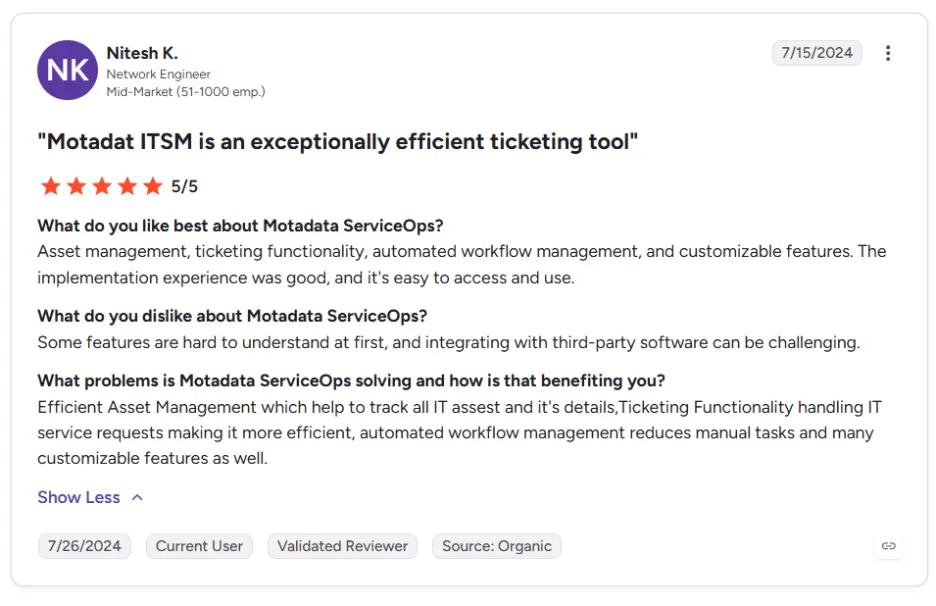
You can check out more of our G2 reviews here.
The honest catch is that Motadata does not publish list pricing, so you have to ask for a quote, and its public review base is still small next to the long-established incumbents. A team that only wants lightweight email-to-ticket conversion does not need this much platform.
Pros
- One subscription covers service desk, asset management, and patching, with modular licensing if you want less.
- AI features are included, not a per-agent add-on.
- Deploys on-premises, in private cloud, or as SaaS, which regulated industries (BFSI, government, healthcare) usually require.
- Multi-tenant support lets MSPs run multiple customers from one instance.
Cons
- Pricing is quote-based, with no public price list to benchmark against.
- Small public review footprint compared with the big-name incumbents.
- Overkill for a team that wants simple ticketing without asset or patch workflows.
Pricing: Quote-based subscription with modular licensing (ITSM, ITAM, and patch management separately or together), concurrent or named user licenses, and a 30-day free trial.
2. Freshservice
Best for: Mid-market teams that want a modern cloud ITSM desk running this quarter, not next year.
Rating: 4.6 on G2, 4.4 on Gartner Peer Insights.
Freshservice is the tool sysadmins name most often when asked what they actually like. In the big r/sysadmin thread on favorite ticketing systems, it drew more recommendations than any other product, mostly for its clean interface and a solid API.
Setup is genuinely fast, and the marketplace covers most integrations a mid-market team needs.
Keep an eye on the pricing ladder, though. The $19 Starter plan is tempting but thin, so teams have to go with the Growth plan at $49 or the Pro plan at $99.
The Freddy AI Copilot costs another $29 per agent per month, and it only comes with Pro and Enterprise plans. A 10-agent team wanting AI assistance is looking at $1,280 a month before overages (extra asset packs run $75 per month per 500 assets).
There is no on-premises option, and a minority of that same Reddit thread pushes back hard on the automation engine's depth.
Pros
- Highest practitioner sentiment of any tool on this list.
- Quick rollout with little admin overhead.
- Strong ecosystem of integrations and apps.
Cons
- AI costs extra and requires the $99 Pro tier first.
- AI costs extra and requires the $99 Pro tier first.
- Usage overages (orchestration, assets) inflate the real bill.
Pricing: Starter $19, Growth $49, Pro $99 per agent per month on annual billing, Enterprise by quote. No free tier.
3. Jira Service Management
Best for: Teams whose developers already live in Jira and want tickets, sprints, and incidents in one ecosystem.
Rating: 4.3 on G2, 4.4 on Gartner Peer Insights.
Atlassian's Jira Service Management earns its place through gravity. If engineering already runs on Jira, JSM gives IT a desk that links tickets straight to the dev backlog.
The free plan (up to 3 agents, 500 automation runs a month) is a real free plan, not a demo. One Redditor called it the only ticketing system they ever liked, largely for that integration plus bundled asset tracking.
Costs climb with ambition. Standard runs about $20 per agent, but the virtual service agent and Atlassian Intelligence features sit in Premium at $51.42 per agent, roughly a 2.5x jump, with AI conversations metered past 1,000 a month.
Teams outside the Atlassian ecosystem tend to find the configuration model foreign, and reviewers say adopting JSM cold, without existing Jira habits, is a slog.
Pros
- Genuinely useful free plan for 3-agent teams.
- Unmatched fit where Jira is already the system of record.
- Strong incident management heritage (Opsgenie lineage).
Cons
- AI requires the Premium tier at 2.5x the Standard price.
- Steep learning curve for non-Atlassian shops.
- Cloud is the clear focus; self-hosted Data Center is the exception path.
Pricing: Free for up to 3 agents; Standard about $20 per agent per month; Premium $51.42; Enterprise by quote.
4. ManageEngine ServiceDesk Plus
Best for: Budget-conscious teams that want real ITSM modules at the lowest published entry price.
Rating: 4.2 on G2, 4.4 on Gartner Peer Insights.
ServiceDesk Plus undercuts everyone on published price: $13 per technician for Standard, $27 for Professional, $67 for Enterprise, in cloud or on-premises.
The Standard edition is even free for small teams, which makes it a common first ITSM tool.
The complaints are as consistent as the praise. Sysadmins in the r/sysadmin thread grumble about stupid little limitations, a dated interface, and support quality on self-hosted installs.
Notice the edition gates too: asset management needs Professional, change and project management need Enterprise, so the $13 headline becomes $67 once you want the full ITIL toolkit.
For a module-by-module side-by-side look, the ServiceOps vs ServiceDesk Plus comparison breaks the two down.
Pros
- Lowest published entry price of the full ITSM tools ($13).
- Free Standard edition for small teams.
- On-premises option at a budget price point.
Cons
- Interface feels dated next to Freshservice or ServiceOps.
- ITIL modules are split across editions, so the real price is usually the $67 tier.
- Recurring practitioner complaints about small workflow limitations and support.
Pricing: Standard $13, Professional $27, Enterprise $67 per technician per month on annual billing. Free Standard edition available.
5. Fini
Best for: Teams whose ticket volume comes from customers rather than employees, in industries where every answer has a compliance consequence.
Rating: 4.9/5 on G2
Fini sits on the other side of the line this guide has been drawing. It does not run an internal IT desk, and it has no ambitions to. It answers customer tickets in fintech, banking, healthcare, and insurance, where a wrong answer about a frozen account or a claim status is a regulatory problem rather than an annoyance.
The relevant difference from the tools above is what the AI is allowed to do on its own. Fini resolves roughly 90% of incoming tickets without a human, at a 99% accuracy rate, and every action that touches a customer account passes through an approval step that the team configures. Deployment runs about 14 days rather than a quarter, because it reads existing help centre content and past tickets instead of requiring a rebuilt knowledge base first.
Compliance coverage is the reason it shows up on regulated shortlists: SOC 2 Type II, ISO 27001, HIPAA-eligible, GDPR, and PCI-DSS. Wefunder, one of its fintech customers, reported a 22% lift in autonomous resolution and 30% more knowledge coverage after switching.
The honest catch is that it solves a different problem from the other tools. There is no CMDB, no asset management, no change or release workflow, and nothing that will help you track a laptop refresh. An IT team looking for internal ticketing should ignore this entry entirely. It earns a place here only because so many teams arrive at a search for ticketing software carrying a customer-support problem, and buy the wrong category.
Pros
- Built for regulated customer support, so the audit and approval requirements are handled rather than bolted on.
- AI is the product, not a per-agent add-on, so the pricing arithmetic in this guide does not apply.
- Roughly two weeks to go live, against the quarter that full ITSM rollouts usually take.
Cons
- Not an ITSM tool. No CMDB, no asset management, no change or release process.
- Wrong fit for an internal IT desk, which is what most readers of this guide are shopping for.
- Smaller public review base than the incumbents on this list.
Pricing: Starts with $0.89 per resolution and goes up to $0.49 as you scale
6. HaloITSM
Best for: ITIL-serious teams that want every module in one license with no add-on arithmetic.
Rating: 4.8 on G2, 4.7 on Gartner Peer Insights.
HaloITSM is the quiet high scorer. PCMag made it Editors' Choice for IT help desks, and the top-voted product answer in the r/sysadmin thread called it the only answer worth looking into if ServiceNow is not a good fit.
The all-inclusive licensing means ITSM, CMDB, change, and asset modules come in one price. Halo has publicly committed that AI stays inside the standard license rather than becoming an add-on.
The trade-off is that the single license is not cheap: the official calculator prices a named agent at $100 per month billed annually, and onboarding packages are a required purchase on top, priced by scope.
Its public review base is smaller than the incumbents', so validate the headline scores in your own trial. Configuration depth also means a real implementation project, not an afternoon setup.
Pros
- Highest combined ratings on this list (4.8 G2, 4.7 Gartner).
- No add-on pricing games, one license covers everything.
- Strong ITIL alignment out of the box.
Cons
- At $100 per agent plus a mandatory onboarding package, it carries the highest published price here.
- Small public review base makes the headline score fragile.
- Needs a proper implementation effort to earn its depth.
Pricing: $100 per named agent per month, billed annually, on one all-inclusive license (concurrent licensing also offered). A required onboarding package is priced separately by scope. 30-day trial.
7. ServiceNow ITSM
Best for: Large enterprises with a dedicated platform team and budget to match.
Rating: 4.5 on G2, 4.4 on Gartner Peer Insights.
ServiceNow is the reference platform for enterprise ITSM, a long-running Gartner Magic Quadrant leader, and G2's number one IT management product in its 2026 awards.
Among the best enterprise IT ticketing systems in 2026, it is the one the others get measured against.
At a 10,000-employee scale, with a team dedicated to administering it, nothing else matches its workflow depth or its ecosystem.
Below that scale, practitioners are blunt. One sysadmin in the thread wrote that over time it got so bulky it needed about 10 seconds just to show a list of tickets.
The Now Assist AI SKUs are metered in assist bundles that licensing consultants estimate add 30 to 60 percent to the base cost. If those numbers made you flinch, you are not the buyer ServiceNow is built for.
Pros
- Category leader in analyst evaluations year after year.
- Handles enterprise process complexity nothing else can.
- Huge talent pool of certified admins and partners.
Cons
- Quote-only pricing at the highest level in the market.
- Widely reported as slow and bulky below enterprise scale.
- AI is metered and quoted, making costs hard to predict.
Pricing: Quote-based only. Third-party estimates range from $70 to $200-plus per fulfiller per month, with Now Assist priced separately.
8. Zendesk Employee Service
Best for: IT desks that treat employee support like a product and care most about the request experience.
Rating: 4.5 on G2; not rated separately on Gartner Peer Insights.
Zendesk built its name on customer support, and its Employee Service SKU brings that polish to internal IT at $29 per agent per month, cheaper than the $55 customer Suite.
The agent workspace and self-service portal are as smooth as anything on this list, and admins who know Zendesk from support roles feel at home immediately.
Zendesk Employee Service is still a support tool at heart. There is no native CMDB or change management.
The Copilot AI add-on costs another $50 per agent per month on top of a Professional-tier prerequisite, and automated resolutions bill at roughly $1.50 to $2 each. IT teams with real ITSM process needs will hit the ceiling fast.
Pros
- Best-polished user experience on this list.
- Employee Service entry at $29 undercuts the customer Suite.
- Deep reporting on support experience metrics.
Cons
- No native ITSM depth (CMDB, change, release).
- AI economics stack: tier prerequisite, $50 add-on, per-resolution fees.
- Cloud only.
Pricing: Employee Service from $29 per agent per month (annual); Growth $59, Professional $99. Copilot add-on $50 per agent.
9. Zoho Desk
Best for: Small teams that need respectable ticketing at the lowest paid price on this list.
Rating: 4.4 on G2, 4.5 on Gartner Peer Insights.
Zoho Desk starts free for 3 agents and its Express tier costs $7 per agent per month, a fraction of most competitors' entry price.
For a small business where one or two people wear the IT hat alongside other jobs, that math is hard to argue with. The Zia AI features come bundled into the $40 Enterprise tier rather than sold separately.
Know what it is: a customer-service help desk pressed into IT duty. There is no ITIL change management and no CMDB (Zoho's own answer for that lives in its ManageEngine sibling), and cloud is the only deployment.
Teams that outgrow email-and-portal ticketing will migrate eventually, so weigh the eventual switching cost against the entry price.
Pros
- Lowest paid entry price on this list.
- Strong ratings on both G2 and Gartner at a budget price.
- AI bundled rather than sold as an add-on.
Cons
- No ITSM modules: no change management, no CMDB.
- Cloud only.
- Light users and some AI paths gate behind higher tiers.
Pricing: Free for 3 agents; Express $7, Standard $14, Professional $23, Enterprise $40 per agent per month on annual billing.
10. osTicket
Best for: Teams with more Linux skill than budget that want free, self-hosted ticketing they fully control.
Rating: 4.4 on G2 (unclaimed community profile); not rated on Gartner Peer Insights.
osTicket is the open-source workhorse of this category. Self-hosted, it costs nothing in license fees forever, and the r/sysadmin thread carries testimonials from teams running it with 30-plus agents precisely because of the money saved.
Email, web form, and API intake cover the basics, and a hosted edition (SupportSystem, from $12 per agent per month) exists for teams that want the product without the server.
You pay in other currencies: your time, a dated interface, and a hard ceiling. There are no ITIL modules, no asset management, no AI, and security patching of your instance is your job.
As a first system for a small technical team, or a permanent one for a disciplined shop, it is honest, capable software.
Pros
- Zero license cost, self-hosted, with full data sovereignty.
- Battle-tested at real scale by cost-conscious IT teams.
- Simple enough to run for years with little admin effort.
Cons
- Dated interface and no native AI features at all.
- No asset, change, or ITIL process modules.
- Hosting, upgrades, and security are entirely on you.
Pricing: Free self-hosted (open source). Cloud-hosted SupportSystem from $12 per agent per month with a 30-day trial.
What Should You Look for in an IT Ticketing System?
Six requirements separate the best ticketing systems for IT support from the ones teams quietly abandon. These come straight from what practitioners test for, and complain about, in the wild.
Email-to-ticket that just works: Users will never fill a portal form for everything. If a forwarded email does not become a clean ticket with the requester attached, adoption dies in week one.
Chat-channel intake: Your users already ask for help in Teams or Slack DMs. A system with a real virtual agent in those channels captures that demand instead of fighting it.
Asset context on the ticket: A ticket that knows which laptop, which OS build, and which past incidents belong to the requester cuts diagnosis time on every single case. Check which pricing tier actually unlocks this.
Automation and API quality: Routing rules, SLA escalations, and workflow automation you can build without a consultant, plus an API your scripts can trust.
Honest total cost: Price the tier you will really need, the AI add-on if you want one, and any per-asset or per-resolution meters. The $19 headline and the real bill can differ by 3x.
A deployment model that matches your rules: If you operate under data residency or air-gap requirements, cloud-only tools are off your list no matter how good they are.
Which IT Ticketing System Is Right for Your Team?
Match your situation to the tool instead of ranking on features you will never switch on. The scenarios below cover most teams:
Your Situation | Start With | Why |
Ticketing, assets, and patching in one subscription | Motadata ServiceOps | One CMDB, one bill, AI included |
Cloud-first, fastest possible rollout | Freshservice | Quickest setup; price the Pro plus Freddy stack first |
Engineering already runs on Jira | Jira Service Management | The free 3-agent plan proves the fit |
Tight budget, but full ITIL modules needed | ManageEngine ServiceDesk Plus | Lowest entry price; full toolkit at the $67 tier |
Regulated industry with an on-premises mandate | Motadata ServiceOps or HaloITSM | Both deploy fully on-premises |
Customer tickets, not employee tickets, under regulatory scrutiny | Built for customer-facing support in regulated industries, not internal IT | |
Zero budget, real Linux skills | osTicket | Free and self-hosted; upgrade when process outgrows it |
Global enterprise with a dedicated platform team | ServiceNow | Deepest workflows at the highest price |
There are two things you need to keep in mind here.
If budget is the constraint, get a ServiceOps quote against the ServiceDesk Plus Enterprise tier before you decide, because the modular licensing often surprises people.
And MSPs with an on-premises or compliance mandate should look at multi-tenant ITSM for MSPs rather than running one instance per client.
Whatever the scenario, do not select a tool based on just a feature grid. Shortlist two tools and run the same 20 real tickets through both trials.
Pick the Best IT Ticketing System for Your Business
Most ticketing tool lists review customer support desks, and picking one of those for an internal IT team is how you end up with tickets that have no asset context and a change process living in spreadsheets.
Pick a tool built for the IT job: ServiceOps if you want ticketing, assets, and patching unified, Freshservice if you want the smoothest cloud desk, ServiceDesk Plus if the budget decides, JSM if Jira is home, osTicket if the budget is zero.
The trade-off with ServiceOps is quote-based pricing (one more call before you can compare it on a spreadsheet), and a lightweight team may not need the full platform.
But consolidation is where mid-market IT is heading, because three overlapping subscriptions cost more than one platform that shares a CMDB.
The teams that fix ticket intake and routing first typically claw back hours per technician every week, and that time goes back into the project work that actually moves the business.
If you want to test that against your own queue, start a free trial and run a real week of tickets through it.
FAQs
What is the most common IT ticketing system?
No audited market-share figure exists for IT ticketing specifically, but ServiceNow dominates large enterprises.
Freshservice, Jira Service Management, and ManageEngine ServiceDesk Plus appear on the most mid-market shortlists. Zendesk is the most widely reviewed tool in the broader ticketing category.
Does Microsoft have a ticketing tool?
Microsoft does not sell a dedicated IT ticketing product. Teams typically build basic ticketing on SharePoint or Power Apps, or connect a proper ticketing system to Microsoft Teams for intake. Dynamics 365 Customer Service handles customer tickets, not internal IT workflows.
Do AI features cost extra in IT ticketing systems?
AI features Often cost extra, and this is the cost that roundups miss. Freshservice charges $29 per agent per month for Freddy AI Copilot; Zendesk charges $50 per agent for its Copilot, and Jira Service Management gates AI behind its Premium tier. Motadata ServiceOps and HaloITSM include AI in the base subscription.
Can an IT ticketing system also handle asset management?
The full ITSM platforms can. Motadata ServiceOps includes IT asset management and a CMDB in the same platform as ticketing, ServiceDesk Plus adds assets from its Professional tier, and Jira Service Management tracks assets in higher tiers. Customer-service desks like Zoho Desk and osTicket do not manage assets.
Is Motadata ServiceOps better than Freshservice?
It depends on your constraints. Freshservice wins on rollout speed, marketplace breadth, and public review volume. ServiceOps wins when you want asset and patch management in the same subscription as ticketing, when AI needs to be included rather than a $29 add-on, or when an on-premises deployment is mandatory. Trial both against the same week of tickets before deciding.
Author
Ramya Shah
Technical Writer
Ramya Shah is a technical content writer with a computer engineering background and roots in automotive journalism. He covers IT Service Management, observability, IT operations, and AI-driven automation. An early adopter of AI-assisted writing workflows, he turns complex IT processes into clear, engaging content optimized for search and answer engines (AEO), lifting content output and organic visibility.