IT Monitoring and Log Management: Why a Unified Platform Changes Everything
IT monitoring and log management is the practice of collecting, analyzing, and correlating performance metrics and log data from across your IT infrastructure — servers, network devices, applications, and security systems — on a single platform. This unified approach gives IT teams real-time visibility into both what's happening (monitoring) and why it's happening (logs).
Here's the reality most IT teams live with: your monitoring tool tells you a server's CPU is at 95%. Your log management system shows an error spike in an application log. But these two facts live in different dashboards, managed by different tools, reviewed by different people. Nobody connects them until the outage is already affecting users.
That disconnect is the problem. When monitoring and log data live in separate systems, troubleshooting becomes a manual correlation exercise. Your team toggles between tools, cross-references timestamps, and tries to piece together a timeline from fragments. It works — slowly. And in IT operations, "slowly" means downtime, frustrated users, and missed SLA targets.
Unifying monitoring and log management on a single platform eliminates that gap. You see the metric spike and the log entry that caused it in the same view, at the same time. Root cause analysis goes from hours to minutes.
The Problem with Separate Monitoring and Log Management
Most IT organizations start with a network monitoring tool. As the infrastructure grows, they add a separate log management system. Then a SIEM for security events. Then an APM tool for application performance.
Each tool does its job well in isolation. But none of them talks to the others effectively. The result is a fragmented view of your infrastructure where:
Network teams see device metrics but not the application logs that explain performance anomalies.
Security teams see log events but can't correlate them with network performance changes.
Application teams see error rates but can't trace them back to the infrastructure components causing the problem.
This fragmentation isn't just inconvenient — it's expensive. When every investigation requires manually correlating data from three or four tools, your mean time to resolution (MTTR) increases. Your team spends more time gathering information than actually fixing problems.
The fix isn't adding another tool. It's consolidating monitoring and log management into a platform that processes both data types natively.
What a Unified Monitoring and Log Management Platform Delivers
A unified platform doesn't just combine two tools into one interface. It fundamentally changes how your team operates by making correlation automatic instead of manual.
Single Dashboard for All Metrics and Logs
Instead of switching between monitoring consoles and log search interfaces, your team works from a single dashboard. CPU utilization, memory usage, storage capacity, network throughput, and application logs all appear in the same view.
This isn't just a cosmetic improvement. When a root cause analysis requires tracing a problem from a network device to an application to a server, doing it in one platform takes minutes. Doing it across three platforms takes hours.
Dashboard customization lets different teams build views that match their responsibilities. Network ops sees device health. Security sees threat indicators. Leadership sees high-level service health. Everyone works from the same underlying data.
Real-Time Log Processing and Correlation
Speed matters in log management. A platform that processes over a billion events quickly on a single server means your team isn't waiting for search results while an outage is in progress.
But speed alone isn't enough. The real value is correlation — automatically connecting a log event to the monitoring metric it explains. When CPU spikes at 2:47 PM, you instantly see the log entries from that exact timeframe on that exact device. You don't search for it. It's already there, connected and contextualized.
This correlation also works across devices. A configuration change on one switch that causes packet loss on a downstream server gets connected automatically. Your team sees the cause and the effect together, not as isolated events in separate systems.
Actionable Log Analytics Across All Data Sources
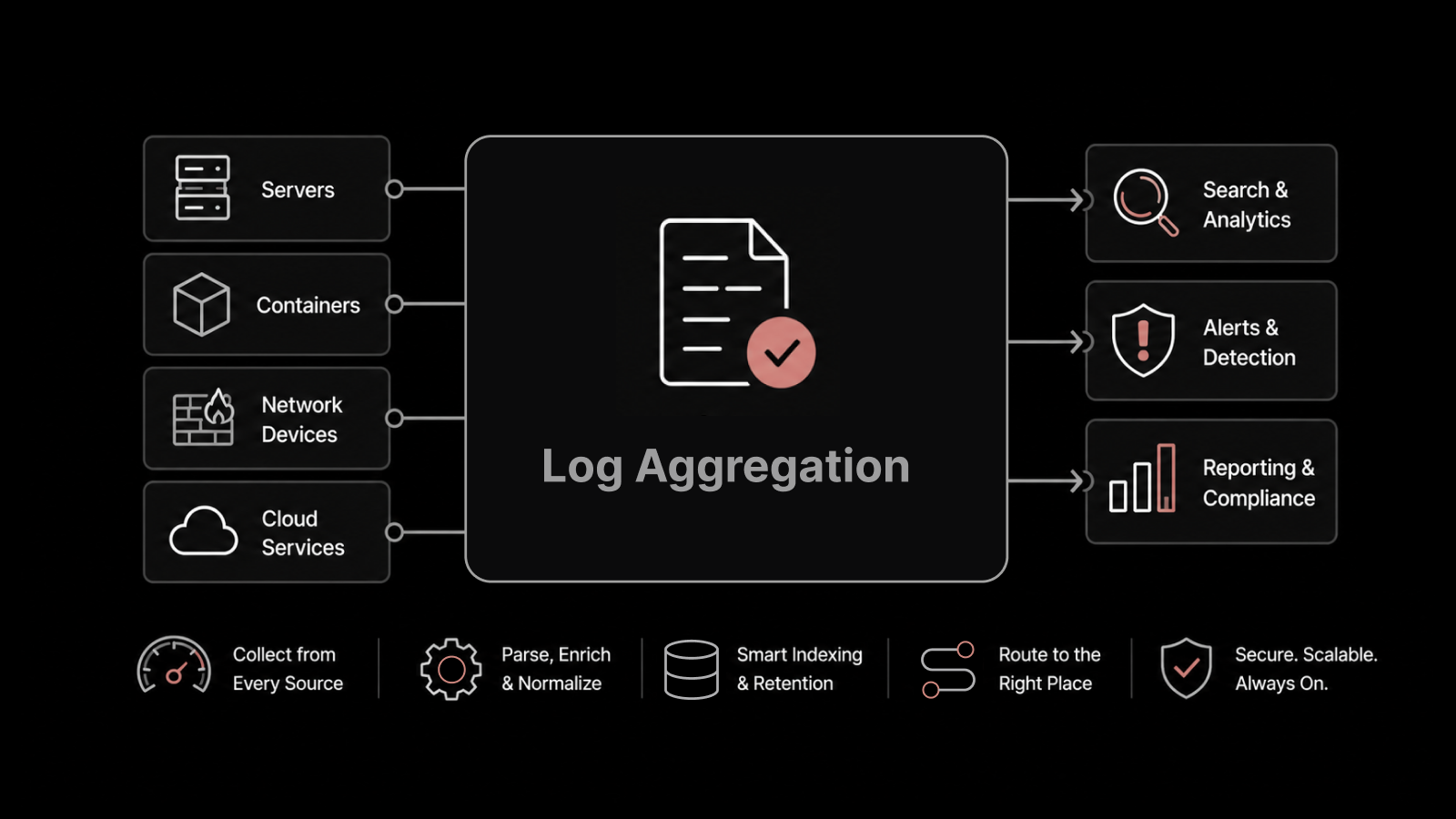
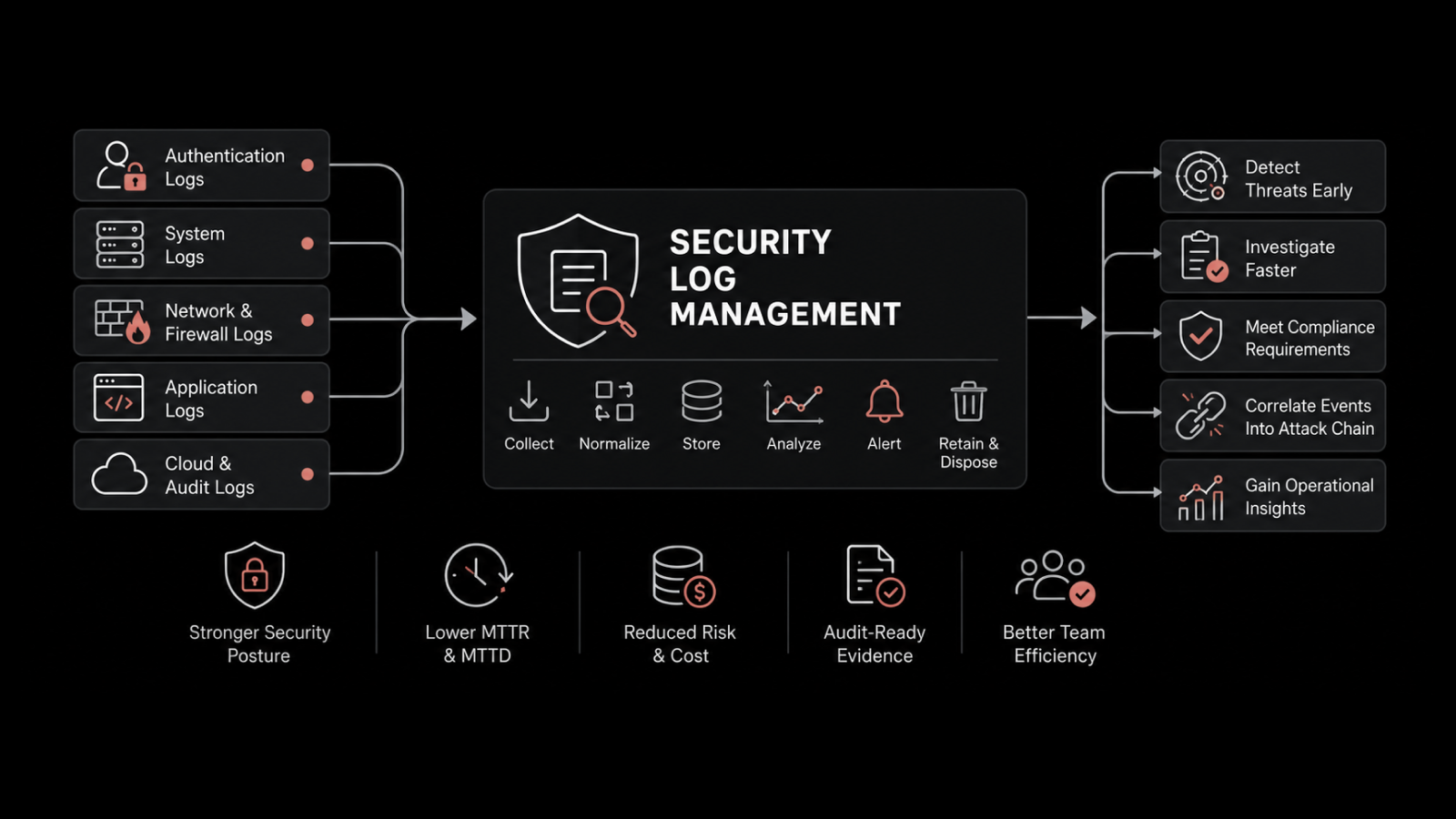
Log data comes from everywhere: network devices, servers, applications, firewalls, load balancers, cloud services, and IoT devices. A unified platform ingests and normalizes all of it, regardless of format.
This means your IT monitoring team can search across all log sources from one interface. A security investigation that spans firewall logs, application logs, and network device logs happens in a single query — not three separate searches in three different tools.
The analytics engine identifies patterns that humans miss. Recurring error sequences, unusual traffic patterns, and configuration changes that precede outages all surface automatically.
Key Capabilities That Separate Good Platforms from Great Ones
Not every unified monitoring platform delivers the same value. Here's what to look for:
Plugin-Based Architecture for Extensibility
Your infrastructure isn't static. You're adding cloud services, containerized applications, and new device types continuously. A plugin-based architecture means you can add monitoring and log collection for new components without overhauling the platform.
The plug-and-play approach also means faster deployment. Instead of a weeks-long integration project, you install a plugin, configure the data source, and start seeing data within hours.
Contextual Alerting That Reduces Noise
Most monitoring tools flood teams with alerts. An alert for high CPU at 2 AM is useless at 8 AM if it doesn't include the context of what was running, what changed, and whether the condition resolved itself.
A unified platform delivers contextual alerts that include correlated monitoring data and log entries. Instead of "CPU high on Server-12," you get "CPU high on Server-12 — correlated with backup job initiated by scheduled task at 1:58 AM — resolved at 2:14 AM." That context tells your team whether to investigate or move on.
Multi-Format Data Processing
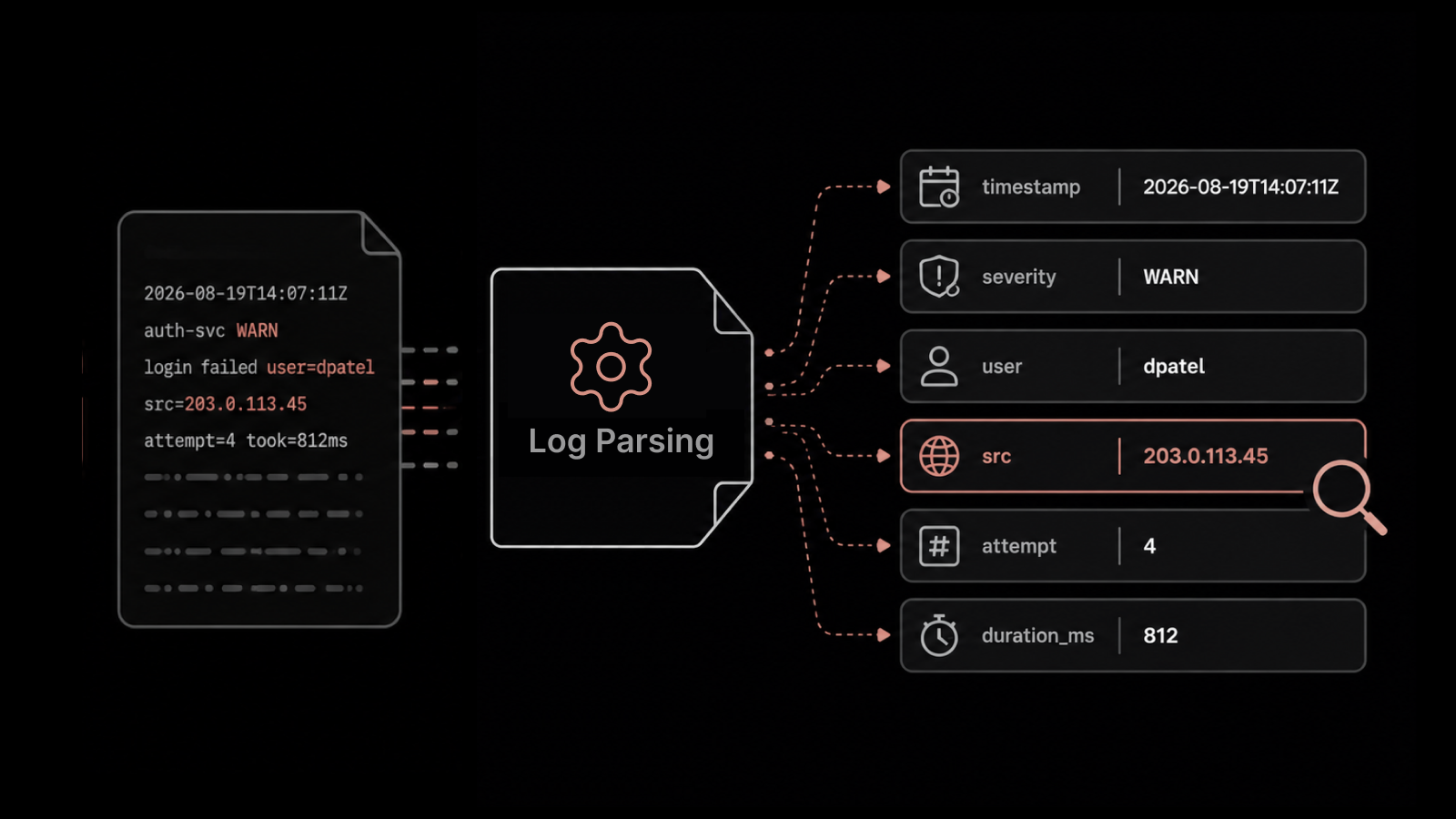
IT data comes in metrics, network flows, syslog, JSON, XML, CSV, and proprietary formats. Your platform needs to ingest all of them without requiring manual parsing rules for each format.
This flexibility is what lets you monitor hybrid infrastructure — physical devices, virtual machines, cloud instances, and containers — from a single system. Each data source gets parsed, normalized, and made searchable alongside everything else.
Automated Remediation with Native Integrations
Detecting a problem is only half the value. The other half is fixing it. Native integration with PowerShell, SSH, and third-party APIs lets your platform trigger automated remediation when specific conditions are met.
For example: when a disk reaches 90% capacity, the platform can automatically archive old logs, notify the storage team, and create a ticket — all without human intervention. This kind of automation turns your monitoring platform from a detection system into an operations engine.
Scaling Log Management Without Slowing Down
One of the biggest challenges in log management is maintaining performance as data volume grows. An organization generating millions of log events per day can't afford a platform that slows down under load.
A scalable platform handles growth through distributed data collection and centralized aggregation. Collectors deployed at each location or data center capture and pre-process log data locally. The primary platform aggregates, correlates, and stores the data centrally.
This architecture means you can expand to new locations without redesigning your log management infrastructure. Each new site gets a collector, and the data flows into your existing platform automatically.
Data retention policies let you keep high-value data (security events, compliance logs) for extended periods while cycling out routine operational logs. This controls storage costs without sacrificing the data you need for audits and investigations.
How AIOps Transforms Monitoring and Log Management
Traditional monitoring tells you what's wrong right now. AIOps tells you what's about to go wrong — and why.
AI-driven analysis across monitoring metrics and log data identifies patterns that static rules and thresholds can't detect. Anomaly detection catches subtle deviations from normal behavior: a 3% increase in response time that wouldn't trigger any alert but signals early-stage degradation.
Noise reduction is another major benefit. AI models learn which alerts are actionable and which are informational, automatically suppressing the noise so your team focuses on problems that matter.
Predictive capabilities flag components that are trending toward failure — a disk that's been filling 2% per day, a network link with gradually increasing error rates, an application whose response time degrades every time a specific batch job runs. Your team gets warning days or weeks before an outage, not seconds after it starts.
See the Full Picture with Motadata
Motadata's AI-native platform unifies IT monitoring, log management, and analytics on a single system. It processes metrics, network flows, and log data from every device, server, application, and cloud service in your infrastructure — then correlates them automatically so your team finds root causes in minutes, not hours. With plugin-based extensibility, real-time processing, and AIOps-driven insights, Motadata gives you the visibility and speed to manage growing infrastructure without growing your team proportionally. Explore Motadata's monitoring and log management platform or contact our team for a guided demo.
FAQs
How much log data can a unified monitoring platform handle?
Enterprise-grade platforms process billions of events per day without performance degradation. The key is architecture — distributed collectors handle ingestion at the edge, while centralized processing handles correlation and analytics. Motadata's platform is built to scale with your data volume, maintaining search speed and real-time processing regardless of how many sources you're collecting from.
Do I need to replace my existing monitoring tools to unify log management?
Not necessarily. Many unified platforms integrate with existing tools through APIs and native connectors. However, the full benefit of correlation — automatically connecting metrics and logs — comes from having both data types processed natively on the same platform. A phased migration is the most common approach: start by adding log management to your monitoring platform, then gradually consolidate.
How does unified monitoring help with compliance requirements?
Unified platforms maintain centralized, searchable, and tamper-evident log archives that satisfy compliance requirements for frameworks like SOC 2, HIPAA, PCI DSS, and ISO 27001. Automated retention policies ensure logs are kept for the required duration. Compliance reports generate automatically, and audit trails provide the evidence auditors need without manual data collection.
What's the difference between monitoring, observability, and log management?
Monitoring tells you when something is wrong based on predefined thresholds and rules. Log management gives you the detailed records to investigate why. Observability is a broader concept that combines metrics, logs, and traces to give you a complete understanding of system behavior — even for problems you didn't anticipate. A unified monitoring and log management platform is the foundation of an observability practice.