Apache Tomcat
Seamlessly integrate Apache Tomcat with Motadata ObserveOps to gain real-time application server insights, proactive monitoring, and optimized performance for reliable web application delivery.
Overview
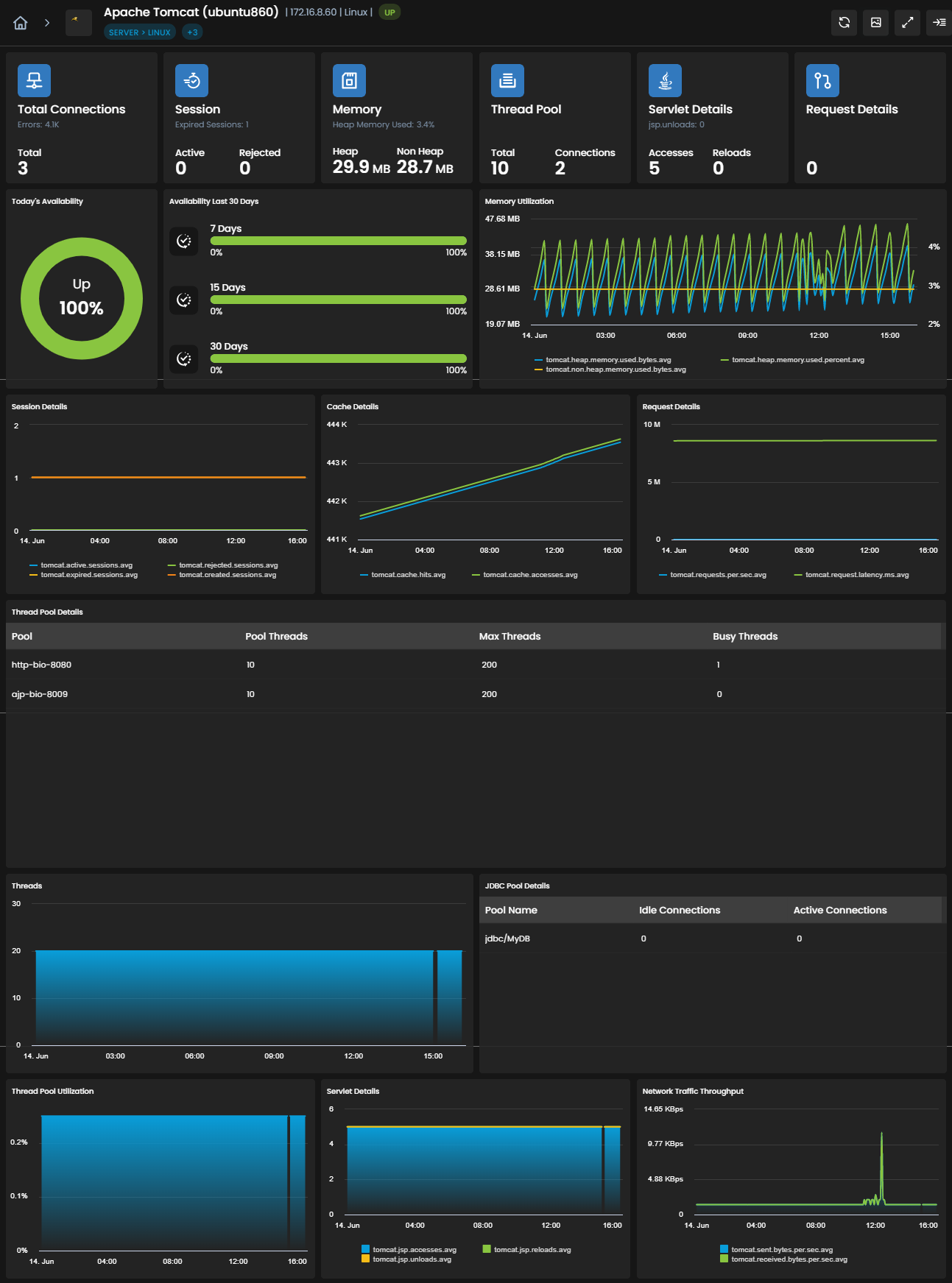
Apache Tomcat, the widely used open-source application server, seamlessly integrates with Motadata ObserveOps to provide comprehensive monitoring capabilities. With this integration, organizations gain real-time visibility into the performance and health of their Apache Tomcat servers. Monitor critical server metrics such as request rates, response times, and JVM (Java Virtual Machine) statistics to ensure optimal application performance.
Supported Versions
Versions |
|---|
6 |
7 |
8 |
8.5 |
9 |
10 |
Prerequisites for Apache Tomcat Integration with Motadata ObserveOps
Ensure that the Apache Tomcat port (default: 8067) is open for the Motadata ObserveOps server.
Provide the necessary credentials, including the username and password, for Motadata ObserveOps to connect to the Apache Tomcat server.
Confirm that the Apache Tomcat service is active and running on the server.
Confirm that the Apache Tomcat process and service are listed in the process and monitor settings of Motadata ObserveOps. Although these may be listed by default, ensure that the names of the service and process match the specific Apache Tomcat version that you intend to monitor.
In the address area of your browser, type http://[IP]:8080/manager/status, submit the address, provide the credentials, and click on the Server Status link to confirm the status of the Apache Tomcat server.
where [IP] is the IP address of the server where Apache Tomcat is installed
Confirm that the Apache Tomcat server supports either HTTP or HTTPS protocol.
In the tomcat-users.xml file, add the following text:
<tomcat-users>
    <role rolename="manager-gui"/>
    <role rolename="manager-jmx"/>
    <user username="[username]" password="[password]" roles="manager-gui, manager-jmx"/>
</tomcat-users>
Here, Replace [username] and [password] with the credentials used to access the Apache Tomcat server. These credentials will be configured in Motadata ObserveOps to enable access to the Tomcat server.
For agentless monitoring, ensure that the user has the required access for remote access to the Apache Tomcat server. For agent-based monitoring, this is not required.
By following these prerequisites, you can integrate Apache Tomcat with Motadata ObserveOps and ensure the smooth functioning of the monitoring process.
List of Supported KPIs
Apache Tomcat
Name | Description | Type |
|---|---|---|
tomcat.cache.hits | Number of cache hits in Tomcat | Count |
tomcat.cache.accesses | Number of cache accesses in Tomcat | Count |
tomcat.jsp.accesses | Number of JSP accesses in Tomcat | Count |
tomcat.jsp.reloads | Number of JSP reloads in Tomcat | Count |
tomcat.jsp.unloads | Number of JSP unloads in Tomcat | Count |
tomcat.active.sessions | Number of active sessions in Tomcat | Count |
tomcat.expired.sessions | Number of expired sessions in Tomcat | Count |
tomcat.rejected.sessions | Number of rejected sessions in Tomcat | Count |
tomcat.created.sessions | Number of created sessions in Tomcat | Count |
tomcat.installation.dir | Installation directory of Tomcat | String |
tomcat.version | Version of Tomcat | String |
tomcat.cache.hit.ratio.percent | Cache hit ratio percentage in Tomcat | Count |
tomcat.non.heap.memory.used.percent | Non-heap memory used percentage in Tomcat | Count |
tomcat.connections | Number of connections in Tomcat | Count |
tomcat.max.threads | Maximum number of threads in Tomcat | Count |
tomcat.thread.pool.used.percent | Percentage of used thread pool in Tomcat | Count |
tomcat.busy.threads | Number of busy threads in Tomcat | Count |
tomcat.threads | Number of threads in Tomcat | Count |
tomcat.requests.rate | Request rate in Tomcat | Count |
tomcat.request.latency.ms | Request latency in milliseconds in Tomcat | Count |
tomcat.request.max.latency.ms | Maximum request latency in Tomcat | Count |
tomcat.errors | Number of errors in Tomcat | Count |
tomcat.received.bytes.rate | Received bytes rate in Tomcat | Count |
tomcat.sent.bytes.rate | Sent bytes rate in Tomcat | Count |
tomcat.non.heap.memory.used.bytes | Used non-heap memory in Tomcat (bytes) | Count |
tomcat.heap.memory.used.bytes | Used heap memory in Tomcat (bytes) | Count |
tomcat.heap.memory.used.percent | Percentage of used heap memory in Tomcat | Count |
started.time.sec | Uptime in seconds | Count |
started.time | Uptime | String |
tomcat.thread.pool.threads | Number of threads in Tomcat thread pool | Count |
tomcat.thread.pool.busy.threads | Number of busy threads in Tomcat thread pool | Count |
tomcat.thread.pool.max.threads | Maximum number of threads in Tomcat thread pool | Count |
tomcat.thread.pool.connections | Number of connections in Tomcat thread pool | Count |
tomcat.thread.pool | Tomcat thread pool | String |
tomcat.jdbc.pool.active.connections | Number of active connections in Tomcat JDBC pool | Count |
tomcat.jdbc.pool.idle.connections | Number of idle connections in Tomcat JDBC pool | Count |
tomcat.jdbc.pool | Tomcat JDBC pool | String |
tomcat.jdbc.pool.used.percent | Percentage of used connections in Tomcat JDBC pool | Count |
Explore More Integrations
Browse our comprehensive integrations catalog to discover all supported platforms and services.